
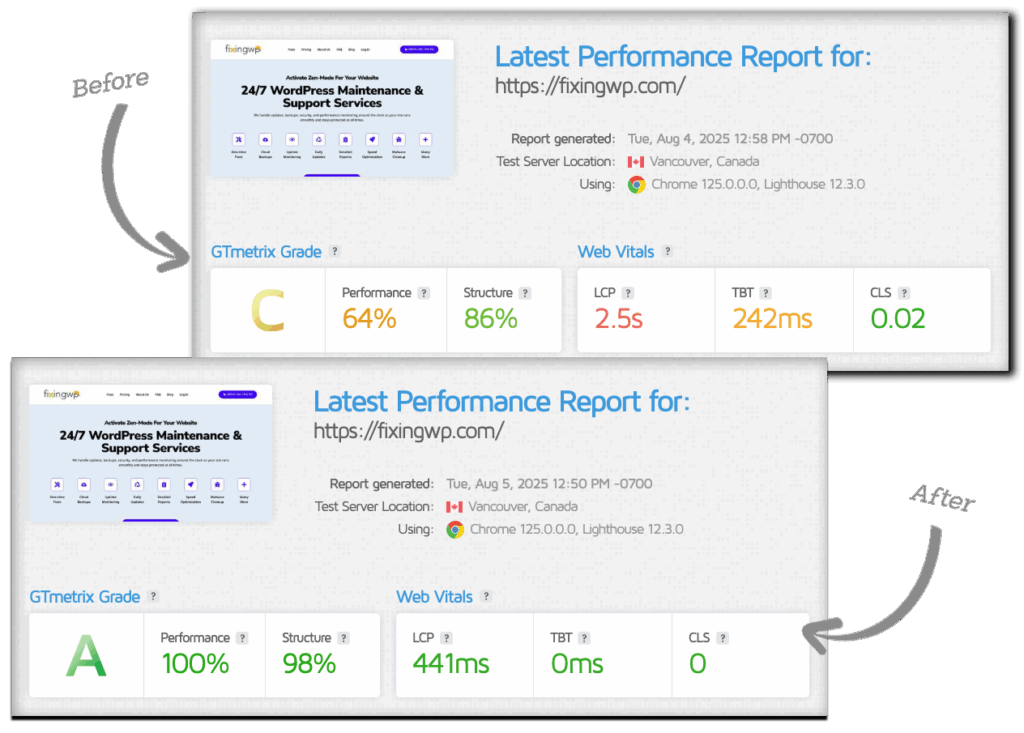
Prioritizing speed optimization for your WordPress site means faster load times, better SEO rankings, lower bounce rates, and higher conversions. A fast site keeps visitors engaged and drives more results for your business.
Visitors expect pages to load quickly. Slow sites frustrate users and make them more likely to leave.
Users are more likely to abandon a site that takes more than a few seconds to load.
Faster sites lead to more signups, sales, and completed actions. Even a 1-second delay can reduce conversions.
Google uses site speed as a ranking factor. A slow site can hurt your visibility in search results.
Mobile users often have slower connections, so speed matters even more on phones and tablets.
A fast site signals quality and credibility, while a sluggish one can seem unreliable or outdated.
And many more…



Select a maintenance plan, or a One-Time fix.

Provide us access to your website so we can start auditing it.

Rest easy knowing our experts are optimizing your website speed and will soon provide you with a blazing-fast website.
Speed optimization isn’t a one-trick pony—we use a combination of proven methods like caching, image compression, code minification, lazy loading, and more to boost your WordPress site’s performance from every angle.
Frontend optimization focuses on speeding up the user experience by minimizing file sizes, compressing images, deferring scripts, and improving how content loads in the browser. This leads to faster load times and a smoother user experience.
Reduces image file sizes without losing quality to speed up loading.
Uses modern image formats that are smaller and load faster.
Removes unnecessary characters from code to reduce file size.
Loads images and videos only when they enter the user’s viewport.
Delays loading of scripts and styles not needed immediately.
Loads only needed fonts and subsets to reduce delays.


Backend optimization improves how your WordPress site runs behind the scenes. It focuses on the server, database, and code to reduce processing time and improve site performance. This includes cleaning up the database, removing slow or unnecessary plugins, optimizing theme and plugin code, and using the latest PHP version for faster performance.
Removes junk data like revisions and spam comments to improve performance.
Disables or removes heavy or unnecessary plugins.
Improves custom theme and plugin code for better execution speed.
Uses the latest supported PHP version for faster and more secure processing.
Website caching is the process of storing copies of your site’s files or content so they can be delivered quickly to users without regenerating them every time. This reduces server load, speeds up page load times, and improves overall performance. Caching can happen at different levels—browser, server, page, object, or via a CDN.
Stores fully rendered HTML pages so they can be served instantly without regenerating content on each request.
Saves the results of database queries to reduce repeated lookups and speed up dynamic content generation.
Instructs the visitor’s browser to store static files (like images, CSS, and JS) locally to avoid re-downloading on each visit.
Caches static content on global CDN servers, allowing users to load assets from servers physically closer to them for faster delivery.

Google Core Web Vitals Assessment is a way for Google to check if your website is fast, easy to use, and stable when people visit it. It looks at how quickly things load, how smooth the site feels when you click or scroll, and whether anything moves around unexpectedly on the screen. If your site does well, it can rank higher in Google search and give visitors a better experience.
Measures how long it takes for the main content (e.g., hero image or heading) to load. A fast LCP means your site feels quick and responsive.
Measures the delay between a user’s first interaction (like a click) and when the browser responds. A low FID means your site is interactive without lag.
Measures how quickly your site responds to all user interactions over time. A low INP ensures consistently smooth interactivity.


Measures visual stability by tracking unexpected layout shifts. A low CLS means content doesn’t jump around as it loads, which avoids frustrating users.
Measures how long it takes for a user's browser to receive the first byte of data from your server after making a request. It reflects the responsiveness of your server and backend processes. A low TTFB means your server is fast at starting to deliver content, which helps improve overall load time and user experience.
Don’t lose visitors to slow load times—our speed optimization makes your site faster, smoother, and built to convert.
Get our Speed Optimization service in two different ways:
The Speed Optimization service is included in our maintenance plans.
Do you have a question about speeding up your website? Below is a list of our most frequently asked questions. If your question is not listed here, please contact us.
We optimize images, minify code, enable caching, clean the database, configure your server, and address Core Web Vitals issues to make your WordPress site faster and more efficient.
Most sites are fully optimized within 24 hours, depending on their size and complexity.
Yes, but we’ll let you know if your hosting is slowing things down and suggest better alternatives if needed.
Yes, we’ll need admin access to your WordPress dashboard and sometimes FTP or hosting access for full optimization.
Our core optimization is a one-time service, but we also offer ongoing maintenance plans to keep your site fast long-term.
Absolutely. We specialize in optimizing complex WordPress setups, including WooCommerce stores.
We offer a satisfaction guarantee. If you’re not happy, we’ll work to fix it or give you a full refund.
Your website will thank us, you welcome :)