


The settings define the allowed memory limit for WordPress, located in the wp-config.php file.
Unless the function is added or modified, WordPress will use the default memory limit, which, in many cases, is not enough to run complex plugins.
Therefore, we need to edit the wp-config.php file to increase WordPress’s allocated memory limit.
The wp-config.php is located in the root folder of your WordPress installation.
You can access the wp-config.php file using FTP software such as FileZilla or the file manager interface from your hosting cPanel.
To fix the limited memory size error in WordPress, follow these steps:
- Access the WordPress root folder
Access your WordPress root folder using FTP software (we can do it for you).
- Open the wp-config.php file
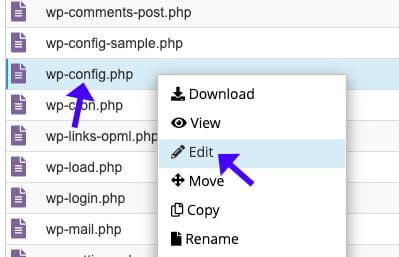
Right-click on the wp-config.php file and select edit.

- Change the memory limit value.
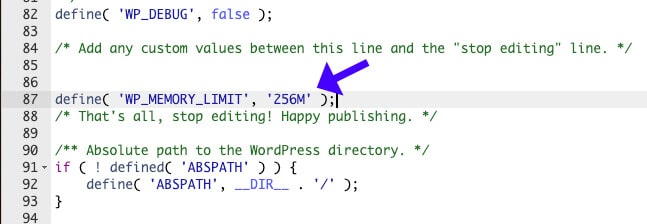
Please search for the WP_MEMORY_LIMIT setting and increase its number to 256M.
- Optional: Add the WP_MEMORY_LIMIT function
You never set it up if you couldn’t find it. Therefore, add
define( 'WP_MEMORY_LIMIT', '256M' );just above/* That's all, stop editing! Happy publishing. */
- Save changes
Save the file.
Once saved, refresh your website and ensure it can load without issues.
Memory Size Limit Error in WordPress – Frequently Asked Questions
The error occurs when WordPress, plugins, or themes exceed the allocated PHP memory limit.
Go to Tools > Site Health > Info > Server in WordPress admin.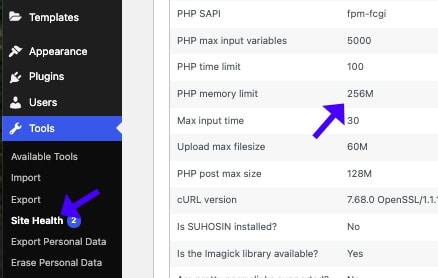
There are a few ways to increase the PHP memory limit in WordPress:
1. Add define('WP_MEMORY_LIMIT', '256M'); to the wp-config.php file.
2. Modify the memory_limit value to 256M (or higher) in the php.ini file.
3. Change to php_value memory_limit 512M in the .htaccess file.
The default memory limit value is 32MB, but basic websites require at least 128 MB. WooCommerce and larger websites require a higher memory limit of 256 or 512 MB.
Yes, poorly optimized plugins or themes can consume excessive memory.
Yes, large databases slow down queries and increase memory use. You can use dedicated plugins to clean and optimize your database or use us.