
Everything you need to know about the

502 bad gateway error

What is causing it, and how can it be prevented and fixed?

WP Bad Gateway Error

What's Causing The 502 bad gateway error?

A 502 Bad Gateway error in WordPress occurs when your web server (e.g., Nginx or Apache) acts as a gateway or proxy and receives an invalid response from an upstream server.

This issue can arise from various sources in the WordPress ecosystem, including server configurations, PHP configurations, plugins, themes, or hosting environments.

It can happen due to a server overload, temporarily down, or extremely slow.

This issue can arise from various sources in the WordPress ecosystem, including server configurations, plugins, themes, or hosting environments.

How to prevent the 502 bad gateway error from happening in the future?

  • Make sure to back up your website regularly to recover to the latest backup, even if it happens.
  • Always download the plugins and themes from the official developer website or a trusted GPL website like PluginsForWP.
  • Always have the latest version of the plugins and themes.

Server overload

The upstream server may be unable to handle the load of requests.

Network errors

Issues with network communication between servers, such as DNS issues, routing problems, or timeouts.

Faulty programming

Bugs in the website's code can disrupt the server's operations.

Did you know...

The 502 bad gateway error is one of the most common WordPress issues; over seven reasons can cause it!

How to fix the 502 bad gateway error?

There are several causes of the 502 bad gateway error, so there are multiple ways to fix it. We will focus on the most popular here.

First, try to restart the server. Sometimes, servers get stuck; a simple restart can fix the issue.

If that didn’t help, please review the WordPress error.log file to discover the root cause. Add the code below to the wp-config.php file to enable troubleshooting and start debugging.

define( 'WP_DEBUG', true );
define( 'WP_DEBUG_LOG', true );
define( 'WP_DEBUG_DISPLAY', false );

Then, follow the steps below to fix the 502 bad gateway error:

  1. Turn off all plugins

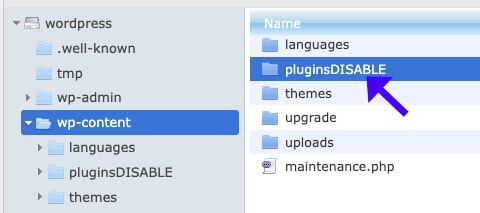
    Access your cPanel and change the wp-content/plugins folder name to pluginsDISABLE. That will turn off all the plugins on your website.Disable Plugins Folder

  2. Switch to the default theme.

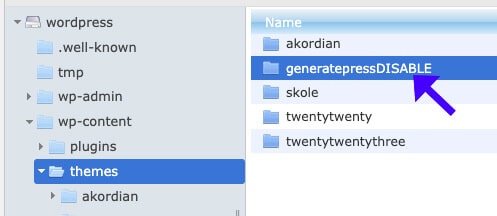
    Navigate to the Themes folder and switch to the default theme by renaming the current theme.Rename Active Theme Name

  3. Test if the problem was solved.

    Refresh your website. If the website is working now, the 502 bad gateway error was caused by the theme or one of the plugins. You’ll need to find which one.

  4. Find the faulty plugin.

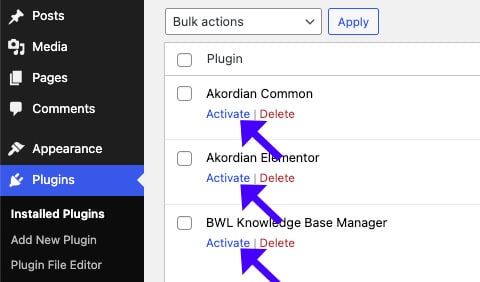
    Start activating the plugins individually to discover which plugin caused the issue.Activate Plugins Individually

  5. Fix the problematic plugin.

    Once you find the problematic plugin, deactivate or update it to its latest version.
Other possible fixes can be:

  • Upgrade your host plan to a better one with more resources.
  • Disable CDN or proxy services such as Cloudflare.
  • Ensure the DNS records are pointing to the correct server address.
  • Make sure the database is well-configured and accessible.

We love fixing the 502 Bad Gateway error and look forward to fixing it for you.

502 bad gateway – frequently asked questions

What is causing the 502 bad gateway?

Multiple causes of the 502 bad gateway error in WordPress can occur, such as poor coding, a lack of resources on the server, a stuck server, poor DNS configuration, and more.

How do I fix the 502 bad gateway WordPress error?

There are several ways to fix it, but first, you’ll need to enable debug mode to find the root cause of the issue.

In most cases, a faulty plugin or theme is the cause. Therefore, deactivate all plugins and reactivate them individually until you find the plugin that triggers the issue. Then, deactivate it or update it.

Can the 502 bad error gateway happen randomly?

Yes. This can happen when the server is overwhelmed with requests, runs out of memory or disk space, experiences downtime, or is undergoing maintenance.

Can a plugin cause the 502 bad gateway error?

Misconfigured or poorly coded plugins or a malfunctioning core system file can trigger the 502 bad gateway error.

Can Cloudflare or a hosting provider cause the issue?

Yes. The 502 bad gateway error mainly occurs on the server side, so misconfigured server settings can trigger the issue.

Do FixingWP can fix it for me?

Yes, we would love to. We specialize in fixing the 502 bad gateway error and can do so in the next few hours.

Disable all plugins

Make sure all the plugins are deactivated.

Refresh the website

Once deactivated, refresh the website to see if the problem was solved.

Find the faulty plugin

Activate the plugins individually until you find the plugin that triggers the error.

Fixing it yourself sounds too complicated?

Let us fix the 502 bad gateway error for you!

Get the 502 bad gateway error fixed in two different ways:

Single Purchase

A single purchase of 502 bad gateway error fix.

$39

Maintenance Plans

The 502 bad gateway error fix is included in our maintenance plans.
Here are a few tips from us before you leave

Practical tips, examples, and best practices to keep your WordPress site safe.

Your website will thank us, you welcome :)